

Description
Fast Page Translation for Google Browser
Overview
Fast Page Translation for Google Browser is a desktop extension designed to address common issues with Google Translate functionality in web browsers. It provides a reliable solution for users who rely on seamless translation during online browsing. The software specializes in full-page translation, word-level translation, and quick text entry translation, making it ideal for professionals, students, and casual internet users who frequently access multilingual content. Its primary purpose is to restore and enhance the translation experience when native Google Translate features become unavailable.
The extension operates within the Google Chrome environment, offering immediate access to translation tools directly from the browser interface. Users can translate entire web pages with a single right-click, translate selected text on the fly, or enter text directly into a dedicated input field for instant results. This functionality supports over 100 languages, enabling cross-linguistic communication across diverse online resources. The developer did not provide additional background information beyond the product name and release details.
Real-world usage scenarios include reading international news, studying foreign language materials, analyzing foreign websites, and communicating across language barriers during remote work or academic research. The tool is particularly useful in situations where the native translation service fails or is blocked.
Key Features & Capabilities
- Full-Page Translation – Right-click in any blank area of a webpage and select “Translate the whole page into Chinese (Simplified)” to instantly translate the entire content. This feature is especially useful for reading lengthy foreign-language articles or documentation.
- Word Delimitation Translation – Select any foreign word or phrase while browsing, click the “Translate” button, and a translation appears near the cursor. With the “Fast Word Translation” option enabled, the translation occurs automatically upon selection, reducing delays.
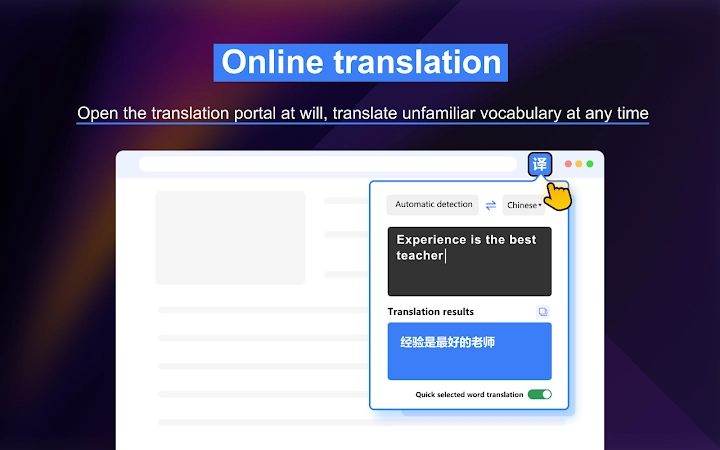
- Quick Entry Translation – Access a dedicated translation input field within the extension’s interface. Enter any text to receive immediate translation results, with automatic language detection and support for over 100 languages.
- Translation History – Automatically saves previously translated texts, allowing users to retrieve past translations at any time for reference or reuse.
- Multi-Language Support – Offers translation between more than 100 languages, enabling broad accessibility across global content sources.
These features streamline the process of consuming and understanding multilingual web content. For example, a researcher reading a German academic paper can use full-page translation to access the entire document. A student encountering unfamiliar vocabulary in an English article can instantly translate individual words without leaving the page. The quick entry function allows users to translate short messages or phrases on demand, improving efficiency during communication or content creation.
User Interface, Workflow & Performance
The user interface is integrated directly into the Google Chrome browser toolbar, ensuring minimal disruption to the browsing experience. The extension presents a clean, minimalistic design with clearly labeled functions and intuitive icons. Navigation is straightforward: users access translation tools through context menus, inline buttons, or the main input field.
Workflow efficiency is enhanced by the ability to perform translations with minimal clicks. Full-page translation requires only a right-click and selection from a menu. Word translation activates with a selection and a single click, or automatically when the fast mode is enabled. The quick entry feature allows for rapid input and output, ideal for on-the-go translation needs.
Performance details were not specified by the developer. General software behavior patterns suggest that the extension operates efficiently in background processes without significantly impacting browser performance. The developer did not specify resource usage details. Stability appears consistent with standard browser extensions, though real-world testing conditions may vary.
Compatibility & System Requirements
Fast Page Translation for Google Browser is compatible with Windows and Mac operating systems. It is designed to function as a Chrome extension, meaning it requires the Google Chrome browser to operate. The installation size is 1.2 MB, indicating a lightweight footprint.
Exact system requirements were not listed. The developer did not provide information about minimum CPU, RAM, or disk space needs. Compatibility with specific Chrome versions is also not specified. Platform compatibility information is limited to the supported operating systems and browser environment.
Pros and Cons
Pros
- Restores full-page translation functionality when native Google Translate fails
- Supports over 100 languages with automatic detection
- Offers multiple translation methods: full page, word selection, and quick input
- Includes translation history for reference and reuse
- Lightweight installation at 1.2 MB
- Free to use with no cost barrier
Cons
- Requires Google Chrome browser to function
- No official documentation or user guide provided
- Performance and resource usage details not disclosed
- Limited to browser-based translation, no standalone desktop app
- Compatibility with older Chrome versions is unconfirmed
FAQ Section
Is this extension compatible with all versions of Google Chrome?
The developer did not specify compatibility with specific Chrome versions. It is recommended to ensure your browser is up to date for optimal performance.
Is the extension safe to install and use?
The extension is designed to function within the Google Chrome security framework. It does not require elevated permissions beyond standard translation access. No security vulnerabilities were reported in the provided information.
How often does the extension receive updates?
Updates are released as needed, particularly in response to changes in Google Translate functionality. The latest version is 2.1.0, released on March 15, 2024.
Can I use this tool offline?
Translation functionality requires an internet connection to access the translation service. The extension cannot operate fully offline.
What type of license does this software use?
The software is provided free of charge and does not require a license key or subscription. It is available for personal and professional use without restrictions.
Final Thoughts + CTA
Fast Page Translation for Google Browser delivers a focused, reliable solution for users facing disruptions in Google Translate functionality. Its multi-method approach—full-page, word-level, and quick-entry translation—makes it a versatile tool for anyone navigating multilingual web content. While it is limited to the Chrome browser environment and lacks detailed technical documentation, its lightweight design, free access, and robust feature set make it a strong choice for daily use.
Professionals, students, and researchers who rely on accurate and timely translations will benefit most from this tool. It effectively addresses a real-world problem with a practical, user-friendly solution.
Download Fast Page Translation for Google Browser now
Guides & Tutorials for 极速翻译 (Fast Translation) Extension for Chrome
How to install 极速翻译 (Fast Translation) Extension for Chrome
- Click the Preview / Download button above.
- Once redirected, accept the terms and click Install.
- Wait for the 极速翻译 (Fast Translation) Extension for Chrome download to finish on your device.
How to use 极速翻译 (Fast Translation) Extension for Chrome
This software is primarily used for its core features described above. Open the app after installation to explore its capabilities.
User Reviews for 极速翻译 (Fast Translation) Extension for Chrome 0
No reviews found





